Make the way you work easier.
Practical software built around a task your business needs to do. Work directly with me on a tool for customers or staff, on its own or connected to your website.
Where does work get repeated or held up?
Perhaps updating content always needs a developer, information has to be copied between systems, or customers need a clearer way to access something. We start with the task and the people using it.
A custom tool can help when ready-made software does not fit the way you work. I explain the options, costs and any other services it would need before recommending a build.
Online shops, appointments and reservations have their own ecommerce and bookings service, including suitable existing platforms. A custom tool is also an option if your business needs something different.
Software with a clear purpose.
These projects show different uses for bespoke software: customer sign-in areas and tools for publishing activities. Each story explains what I built and whether it is live or still in development.

Energy and engineering consultancy
North Yorkshire, United Kingdom
A live energy consultancy website for KAGES, with bespoke client-access software and SEO spanning technical foundations, content strategy and backlink outreach.
ServicesWebsiteSoftwareOngoing SEO
Read the story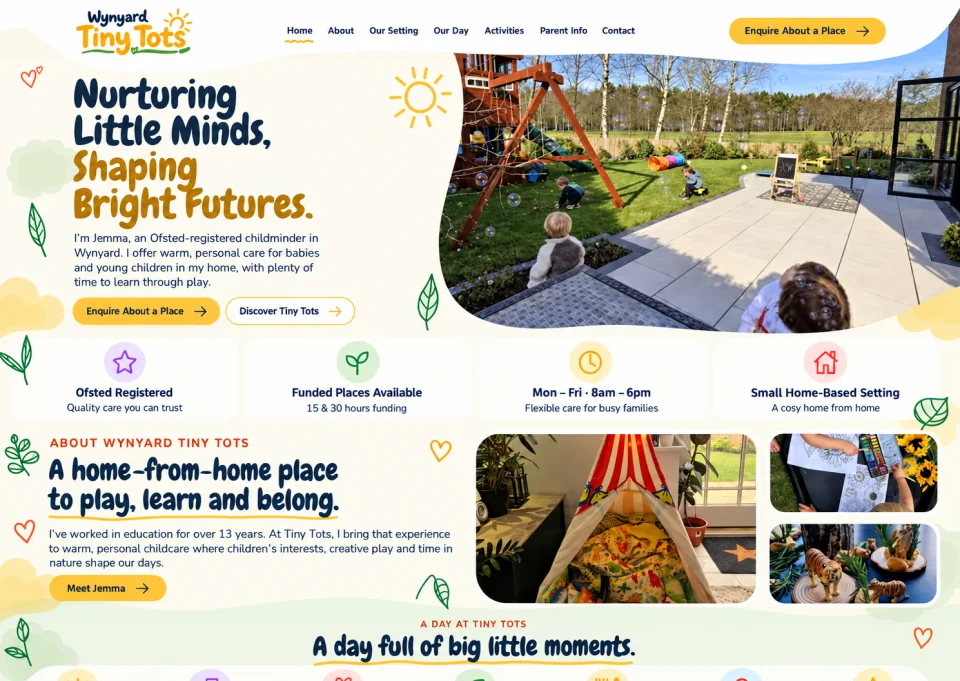
Home-based childcare
Wynyard, Stockton-on-Tees
A childcare website and bespoke activity publishing tool that lets Jemma keep real experiences up to date herself.
ServicesWebsiteSoftwareSEO Foundations
Read the storyA useful tool for a specific task.
Here are a few examples. We choose the features and any connections to other software around your business.
Content publishing
Let the right people add activities, images or other agreed content without asking a developer for every update.
Customer areas
Give customers a place to access the information or actions your service needs. We agree exactly what belongs behind sign-in.
Quotes & everyday tasks
Help a customer request a quote or complete a task, following the steps your business needs.
Internal business tools
Organise jobs and information, or reduce repetitive admin for you and your staff.
System connections
Explore whether your website and other services can exchange the information you need, after checking what those services allow and what they charge.
Clear steps, with me involved throughout.
01 / Understand the task
We look at who will use it, what they do now and the information involved.
02 / Agree a useful first version
I explain what it will do, what is included, what it costs and when you’ll try it out. Starting with a smaller first version can make sense.
03 / Build & try it together
You review the tool against the agreed task so that practical feedback shapes the finished work.
04 / Handover & ongoing help
I explain how to use it and agree support, account responsibilities and any recurring services.
Bring the problem. We can work out the rest.
You do not need a detailed plan. A description of the task, who uses it and where things slow down is a useful beginning.
Access, ownership, training, third-party charges and support are addressed in the project agreement. Extra features can then be quoted with their purpose and cost clear.
See the software starting routeTell me what needs to work better.
A new website, easier bookings or a tool to help with day-to-day work? Tell me what you need.
Tell me what you need